How to Build Real-Time SAP B1 Dashboards for Better Business Decisions
In the modern business environment, decision-makers need instant access to critical information. However, in the traditional report-centric approach, the information is usually delayed. Real-time dashboards in SAP Business One ERP analytics allow for better business operations monitoring and tracking of KPIs.
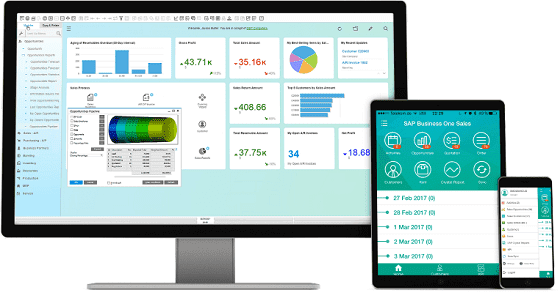
Real-time dashboards provide visual representations of business data, enabling managers to easily understand the trends and operational issues. With SAP Business One dashboards, organizations can monitor sales, inventory, finance, and manufacturing data in single platform.
Key advantages include:
To develop effective dashboards in SAP Business One, the focus should be on the selection of the right metrics and tools for visualization.
Important elements include:
Building dashboards in an SAP Business One is a structured process that makes a meaningful insight.
Businesses using SAP Business One with HANA as the database platform can take advantage of the SAP B1 HANA dashboard features to get instant analytics and in-depth knowledge. The in-memory database technology provides the ability to process large volumes of business data in real time, enabling instant reporting and predictive analysis on the dashboards.
Key benefits of SAP B1 HANA dashboards include:
SAP Business One’s real-time dashboards enable organizations to transform raw data into actionable insights. Organisations can make better, quicker, and smarter decisions, keeping up with the changing business environment, through the tracking of key metrics and the instant visualization of business performance.
As a leading SAP Business One partner, eNoah can deliver end-to-end ERP services including SAP B1 dashboard customization support. Our experts can help you identify the right KPIs, integrate data across modules and build informative dashboards. It enables companies to leverage real-time data for more informed decision-making.